Getting Started with Algorithmic Composition in Max
· Tutorial
An Ancient Problem
How do you develop ideas for a musical composition? This is a very old problem that has preoccupied composers for centuries. One answer is to make up some rules and apply them rigorously. The question becomes, ‘how do you make up rules to develop ideas for a musical composition?’.
By changing the first question into the second, we are starting to explore a field of musical creativity called ‘algorithmic composition’. Or to put it another way, when we apply rules in our composing, we are composing algorithmically.
An algorithm is a series of steps for achieving a particular goal. So to compose algorithmically is to design or apply a set of musical rules—a procedure—to generate a musical outcome.
This means shifting our compositional focus from the output to the process itself—spending time devising the sequence or structure that produces a meaningful result.
Composing with Computers
It’s difficult to say when the term ‘algorithmic composition’ originated. Musicians have sought connections between music and mathematics at least since the thirteenth century.
The term ‘algorithmic composition’, however, is best thought of as a twentieth-century expression. This is because it became particularly associated with developments in computer music in the 1950s.
But this connection between algorithmic composition and computers doesn’t mean that analogue/digital computation is required to compose algorithmically. It’s perfectly possible to compose algorithmically using a pencil and paper.
For this reason, the phrase ‘computer-aided composition’ is sometimes used as a way of referring to the act of delegating certain compositional tasks to a computer.
And if we wanted to be more precise in describing this kind of work, we could use the phrase ‘computer-aided algorithmic composition’ (CAAC or ‘see-ack’). The addition of the word ‘algorithmic’ helps clarify that the ‘computer-aided’ tasks involve generative algorithms.
This is particularly useful today, since lots of musical creativity happens on a computer and not all of it involves generating musical content algorithmically. Think of DAW-based MIDI composition via a piano roll, for example.
Why Automation?
So that gives us some historical context and some idea about descriptive terms. But why would we want to automate our creative tasks in the first place? Why delegate the challenges of composing to a non-human machine?
As suggested above, one reason is simply to help us with the task of producing musical ideas. It might be that we are having trouble getting started or have just run out of new ideas. This is a very practical reason to use an algorithmic technique.
Alternatively, we might want to delegate our creative tasks to a computer because we are particularly interested in the concept and methods of using computers for compositional purposes and in the musical output that the computer provides.
In this second case, our usage is probably more than just practical. It might be part of a larger ‘enquiry’ into the possibility of machine-human interaction in a creative context.
We might describe this approach as somewhat philosophical in the sense that it raises certain questions in a specific way––questions like ‘what is the nature of creativity?’ and ‘what do we mean by “originality”?’.
A question of scale
Beyond the generation of ‘ideas’, a computer might be called on to generate a fully fledged musical composition. In other words, we might think about computer-aided composition as something we can deploy to various degrees.
For instance, our focus might be ‘atomic’, meaning that we might seek to generate musical material on a small-scale, like individual notes or rhythmic fragments.
In this case, we might say that we are working on a ‘micro’ level. An example might be a six-note melody.
Alternatively, we might seek to generate material on a much larger scale (‘macro’ level). We might write and run an algorithm on a computer that generates the framework of an entire musical composition.
This larger-scale work might literally mean generating an entire composition from a series of initial instructions. Or we might devise a hybrid, multi-stage process, whereby certain, precomposed fragments (of any origin) are sent to a computer programme for further development.
Such a programme might be designed to return previously unseen material that extends these small-scale fragments in a meaningful way, but ensures that they also retain some formal, ‘resemblance’ or connection to those original fragments.
Again, this choice between micro- or macro-level work might reveal the extent to which a composer seeks to investigate the meaning of human-machine interaction (the philosophical issue described above).
Remember that the choice in ‘scale’ very likely determines the amount of time needed for writing any preliminary computer programme, before any musical material is actually generated.
One other very good reason to use computers is because they are quick and precise in carrying out highly repetitive tasks, where humans are slow and prone to making errors.
So the act of delegating compositional tasks to computers might very well be for reasons of efficiency and accuracy. Whatever the reason, when we use computers to help us compose, we automate some aspect of our creative musicianship.
Getting started: Installing the Bach package in Max
So let’s do some algorithmic composition in Max. First we need to download and install two packages which are freely available via the Max package manager. These packages are from the Bach family of tools, which are designed to automate compositional tasks in Max.
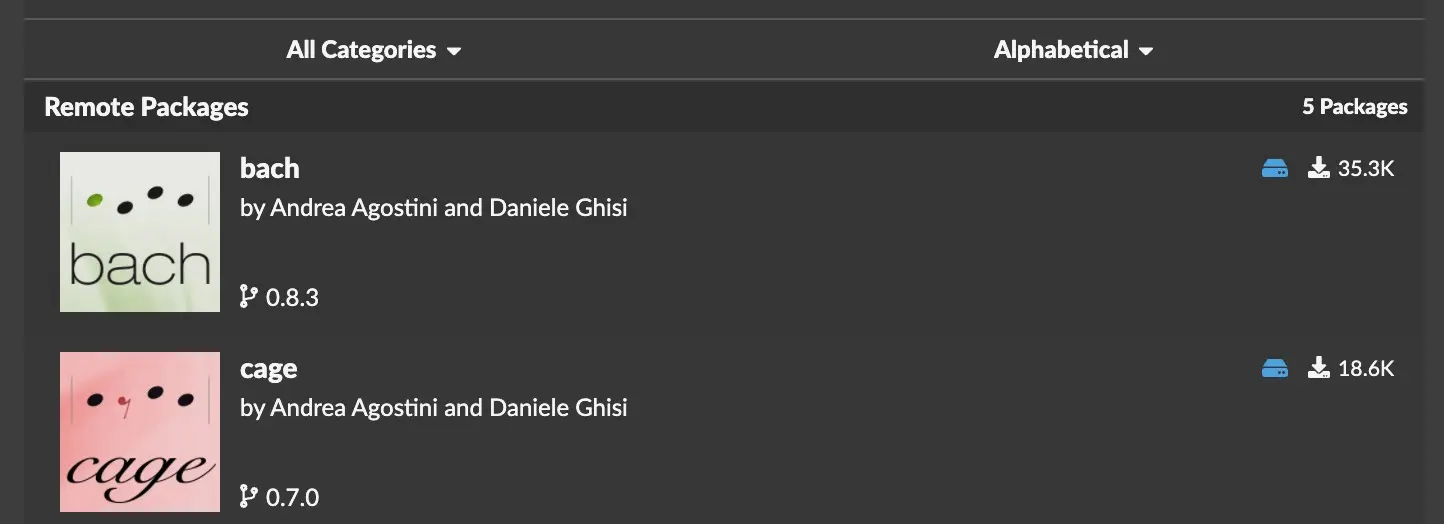
The Bach package brings Western music notation into the Max patching environment. This can be especially useful for those coming to computer-aided composition from a training in score-based music, ‘classical’ music.
You can learn more about the Bach family of packages on the Bach website, where you will also find a link to an active user forum suitable for asking technical questions.
But how to begin?
Sometimes, the problem with composing is knowing how to start. The best thing is to develop some kind of ‘seed’ material quickly and then to focus on developing it.
Composition can be described as a ‘putting together’ various (musical) elements. So it can be liberating to focus less on the materials and more on the way you make connections between them.
In any case, one solution to the problem of starting is to randomize the selection of some kind of material––a note, say. Randomization is a classic technique that is present in all areas of computer music production.
It is useful because it helps the composer take a step forward, not only in getting started, but also in jumping past any creative ‘blocks’.
So let’s start by randomizing the choice of note. We’ll use an object in the Cage package called cage.noterandom. This will generate a melody by selecting randomly from a given reservoir of notes.
We will need to write the note reservoir as a list of notes given in midicents. A midicent is a cent of one MIDI unit or half-tone. So given that the MIDI value of middle C is 60, the equivalent pitch in midicents is 6000. See this article from IRCAM for reference. Here’s our C major scale in midicents:
| pitch | midicents |
|---|---|
| C | 6000 |
| D | 6200 |
| E | 6400 |
| F | 6500 |
| G | 6700 |
| A | 6900 |
| B | 7100 |
| C | 7200 |
Build a random patch
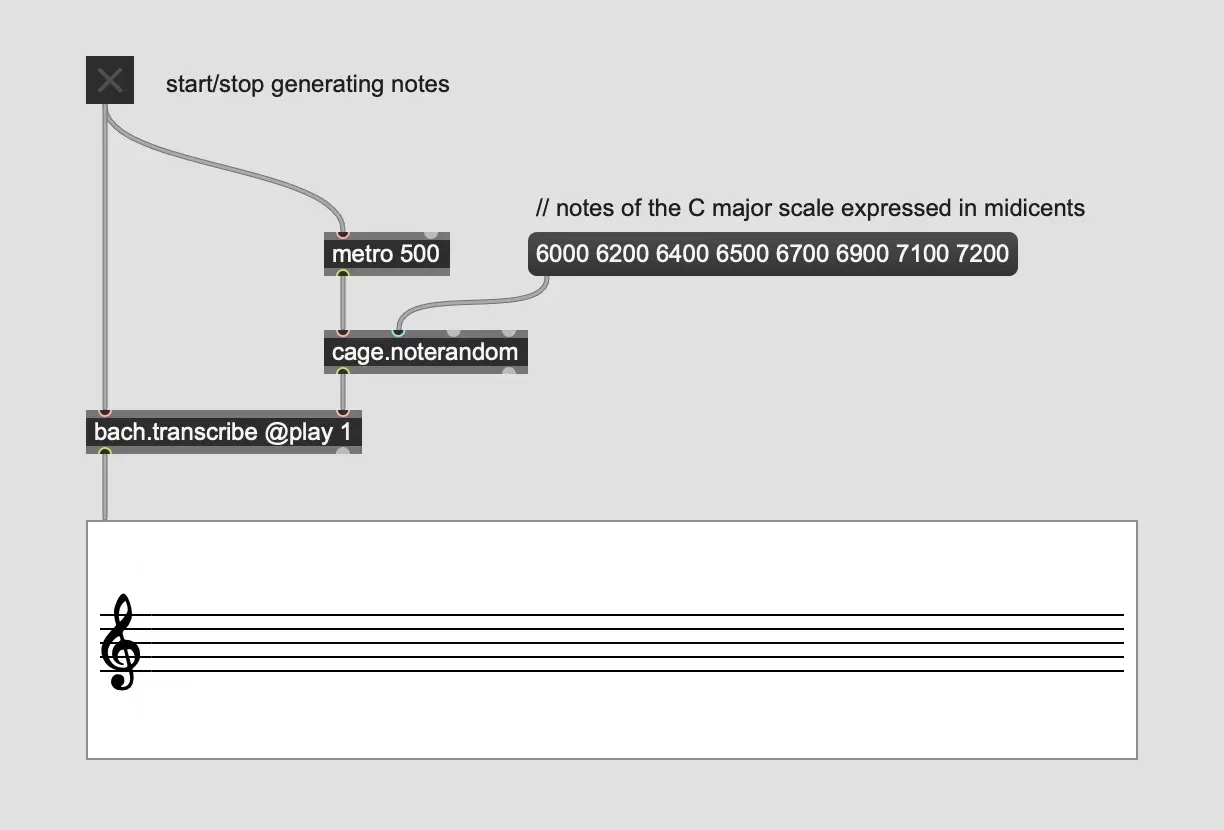
First, add the cage.noterandom object to the patch.
Next, add a message object with a list of midicent values and connect it to the second inlet of the cage object. The list of midicents values will be used as a reservoir of notes that will be passed to the cage.noterandom for random selection.
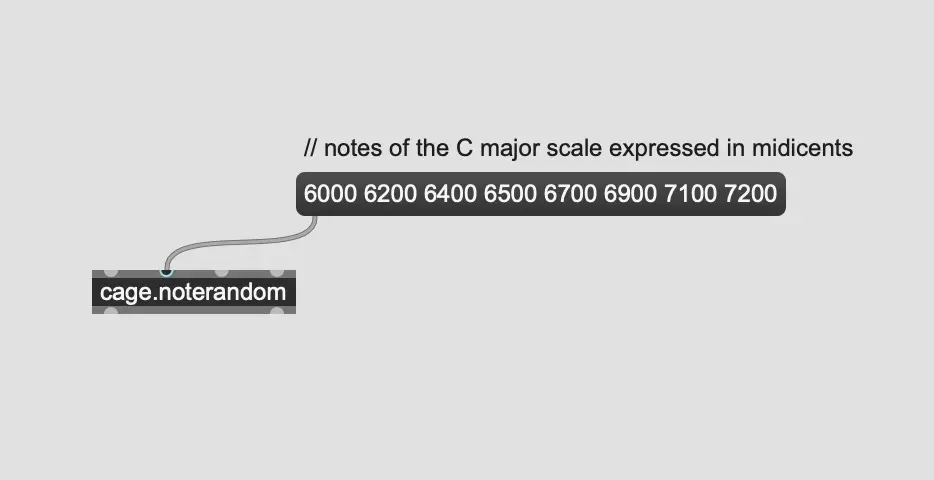
In this example, the list contains the pitches of a C major scale represented in midicents. Every time we send a bang message to its first inlet, the cage.noterandom object will return one of the notes of the C major scale.
In order to show these random notes in musical notation, add a bach.roll object. This will create a musical staff.
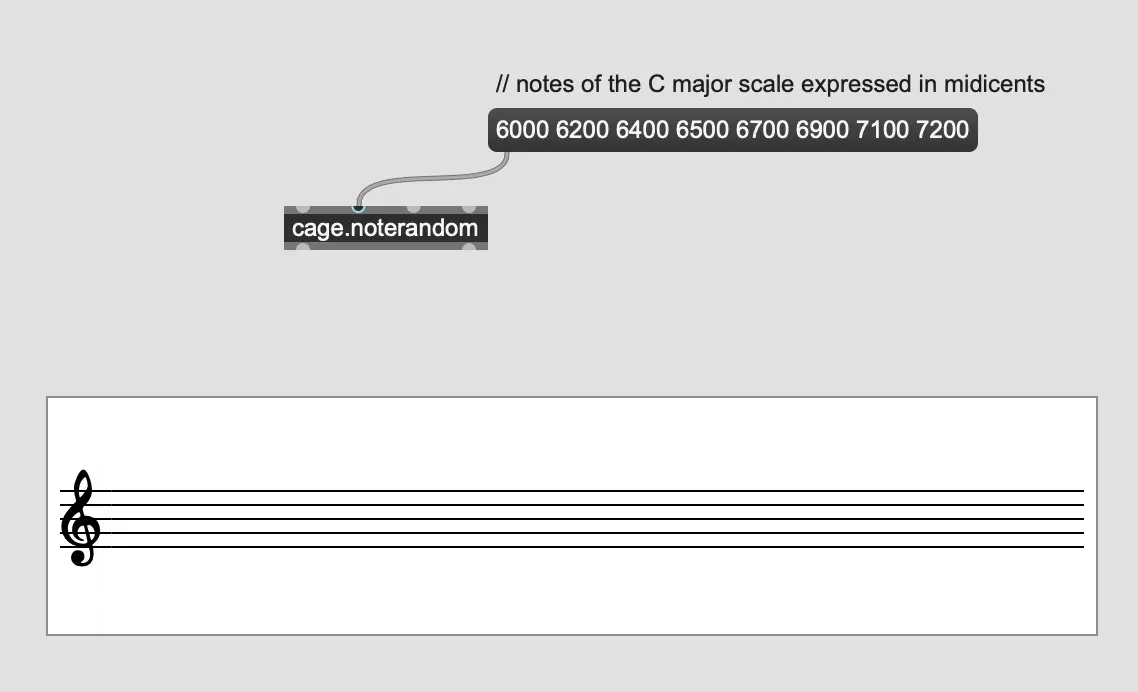
To display the random notes on this staff, we need to add another object that will show the different notes output by cage.noterandom at a regular interval.
Add a bach.transcribe object and attach the left outlet of cage.noterandom to the right inlet of this bach.transcribe. This object will transcribe the random pitches in musical notation. Give the bach.transcribe object the attribute @play 1.
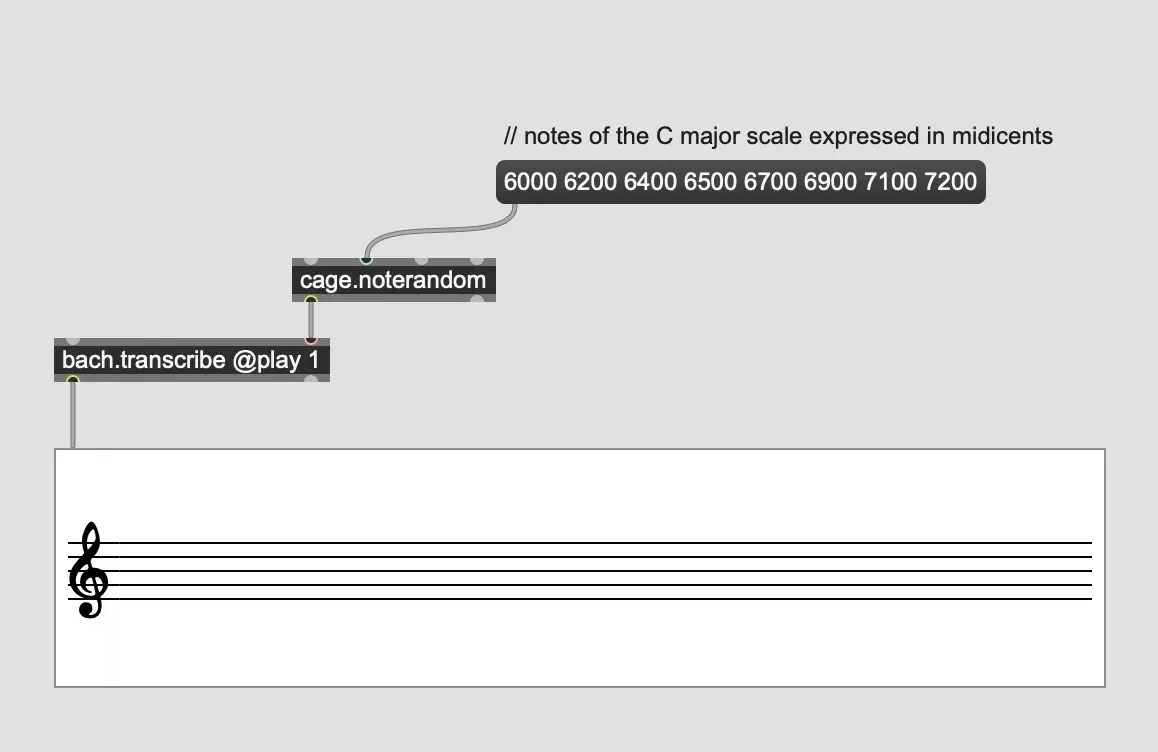
Next, attach a toggle object to the first inlet of bach.transcribe. This toggle object lets the user start/stop the transcription. Finally, attach a metro object to cage.noterandom and attach the metro to the toggle object.
Choose a value in milliseconds as an argument for metro. This value represents the amount of time between each random note. A value of 500 milliseconds would send two random notes every second to the transcriber.
Now generate some musical content
To generate a series of random notes from the C major scale:
- Click the message box with the list of midicents. This sends the list to cage.noterandom.
- Click the toggle on to send a value of 1 to start both the metro and bach.transcribe.
- Stop the generation of notes by clicking the toggle again. This will stop the metro and switch off the transcriber.
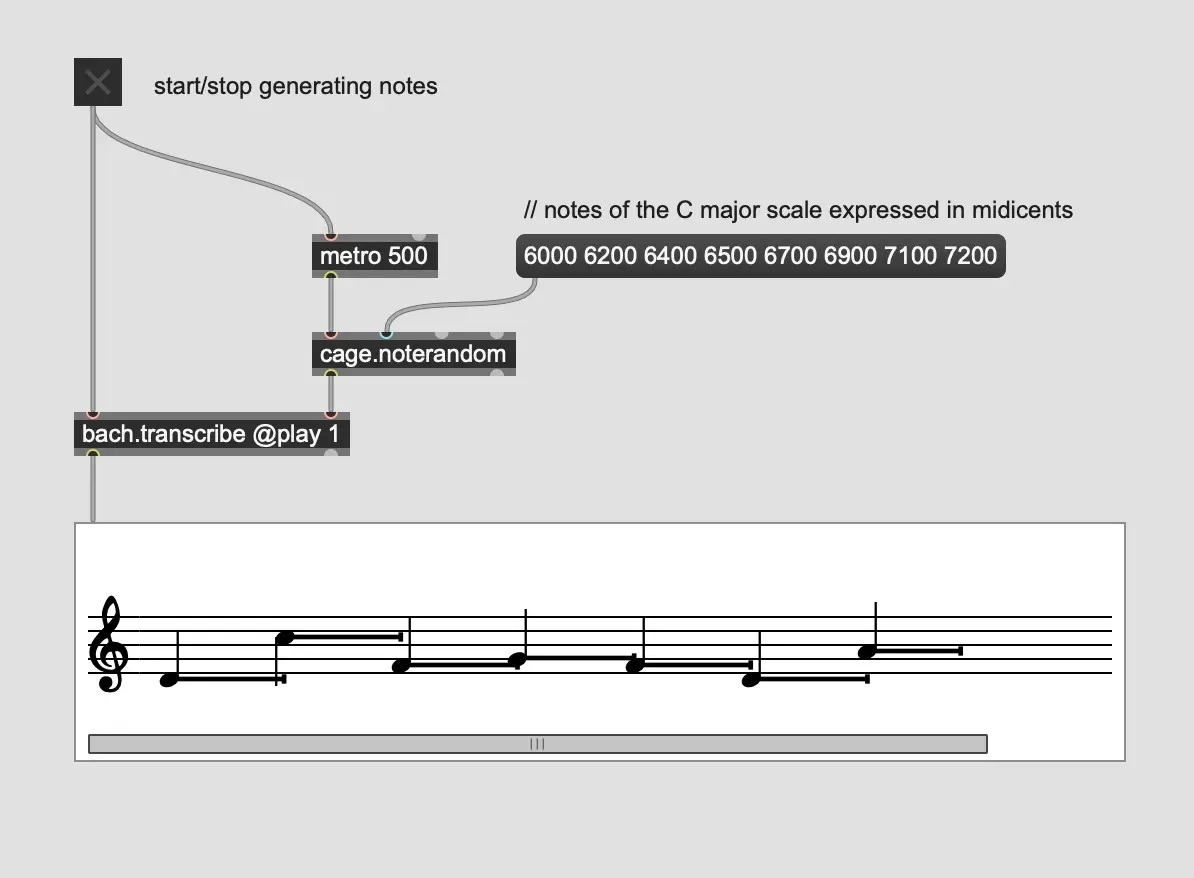
This is how the patch works:
- The metro object sends one bang per time-interval (set as an argument in milliseconds) to cage.noterandom.
- The cage.noterandom object selects one note value at random from its reservoir of midicents values and sends that value to bach.transcribe.
- The bach.transcribe object receives the midicents value and converts it to musical notation for display in bach.roll.
- The bach.roll object displays the incoming values as quarter notes for as long as the toggle remains switched on. The object will scroll automatically for as long as the generation of notes continues.
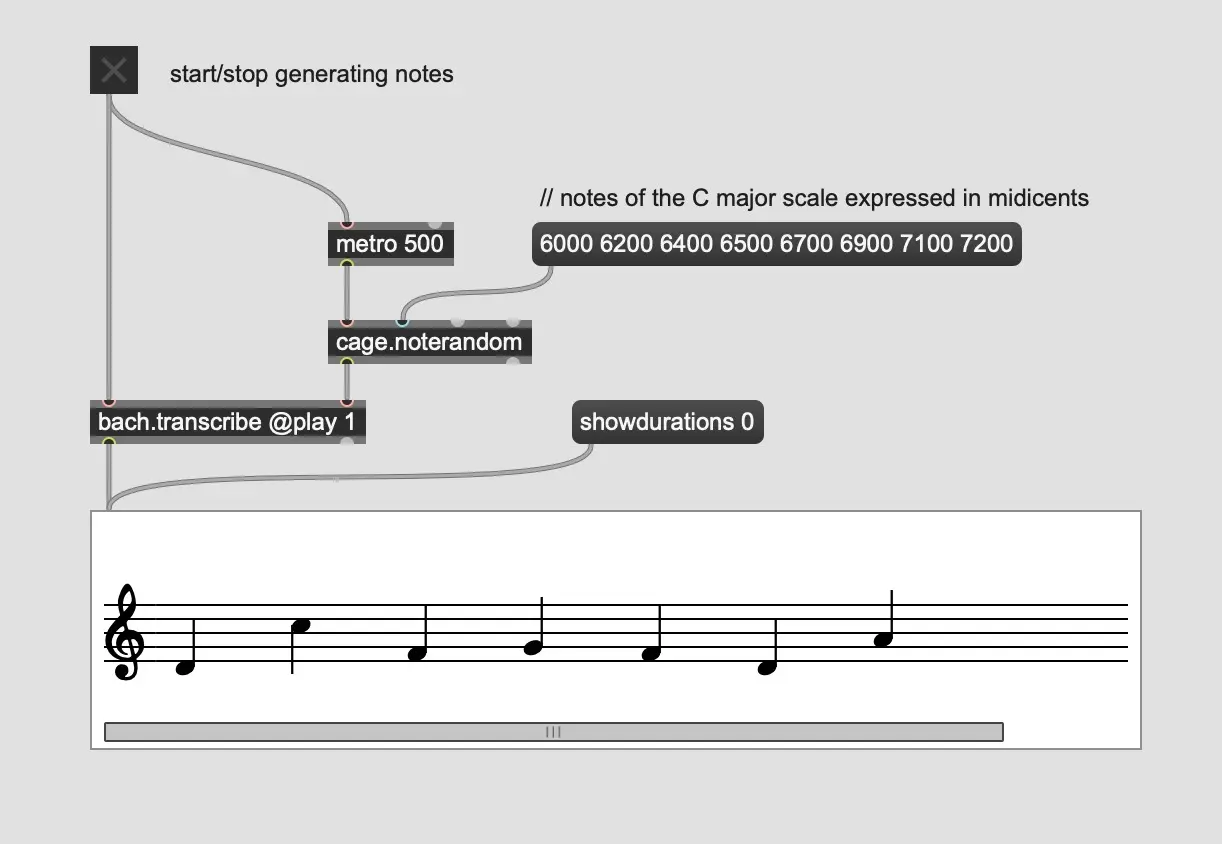
The horizontal lines in bach.roll indicate the duration of the note. If you prefer not to have these lines showing, send bach.score the following message: showdurations 0.
Next steps
Now we have some musical notes. If we think about this sequence of 7 notes as musical information and look for musical characteristics and patterns in this information, we may find we start to get ideas about what to do next.
In the next article, we’ll look at how we can work with this information and generate more musical content that remains closely connected to this original sequence.
Frequently Asked Questions
-
What is algorithmic composition in music?
Algorithmic composition is the process of creating music using a structured set of rules or algorithms to generate musical ideas.
-
What are Bach and Cage packages in Max?
The Bach and Cage packages are Max MSP tools designed to facilitate algorithmic and computer-aided composition.
-
Can I use algorithmic composition without coding?
Yes, tools like Max MSP allow you to create algorithmic compositions visually, without requiring traditional coding skills.